Graded quiz
Questions spread across the tour, scoring, pass mark, shuffling, attempts, final report and a PDF certificate with the student's name.
 andarama
 andarama lets me walk through panoramas
Upload your 360 photos, connect them like you would sketch a floor plan and publish a tour anyone can stroll through from any browser, VR headset included.
open source (EUPL-1.2) · free on your own server · hosted here from $2 a month
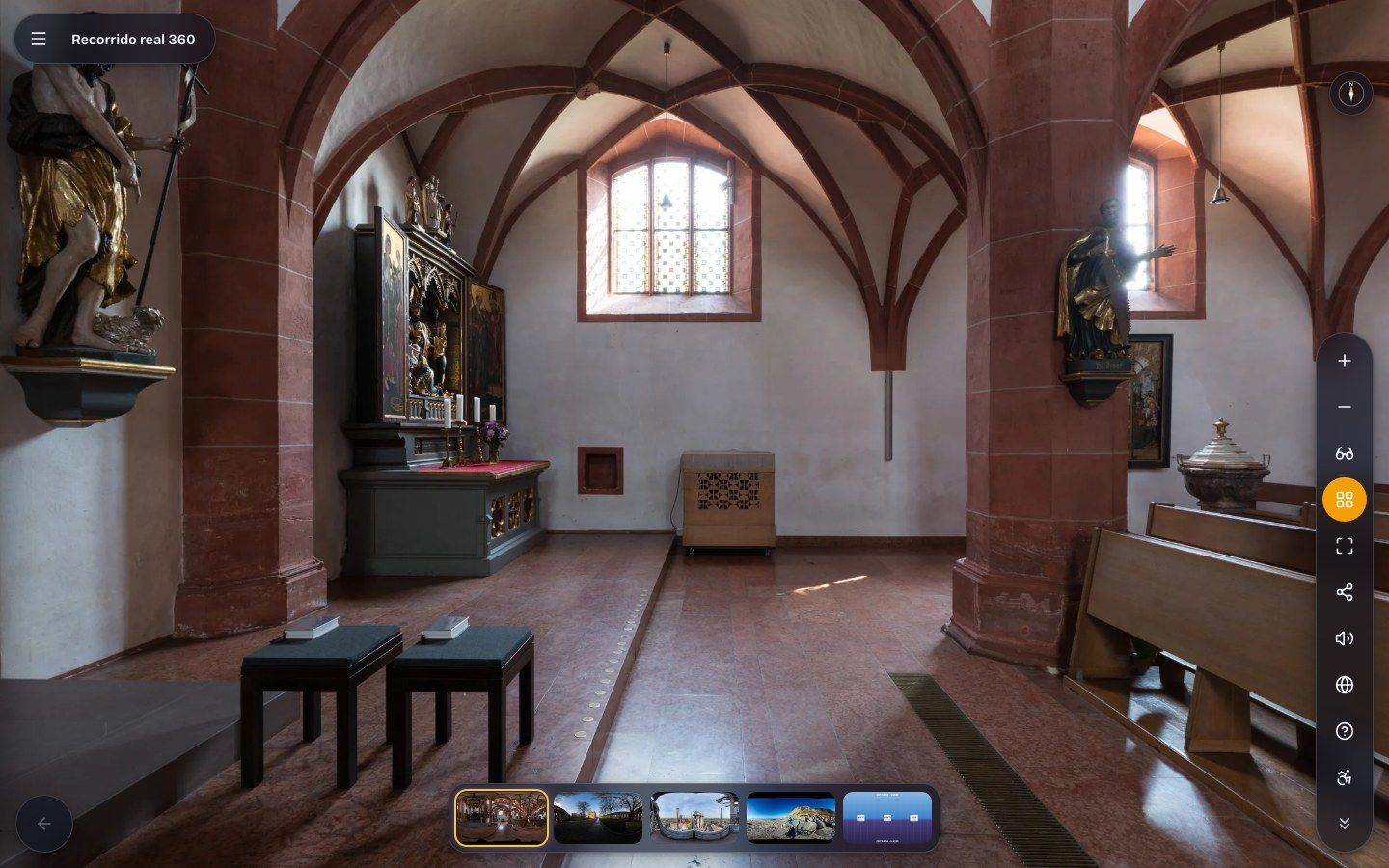
This is not a video: it is a tour published with Andarama. Drag to look around, press the arrows to walk. Try the projection menu and the headset button.
spherical photographs from Wikimedia Commons (CC BY-SA) · attributions live inside the tour itself
From any 360 camera or from your phone. The importer reads a whole batch, sorts by the camera's numbering, renames by pattern and tiles the panoramas in your own browser, up to 32K, without waiting for any server.
Drag one scene onto another and there is a step, with its way back. In the graph every arrow is a navigation hotspot: there is no parallel data to drift out of sync.
Text, photos, videos, audio, PDFs, 3D models, questions, forms, floor plans, narration with spatial audio and translations. Seventeen hotspot types, every one of them usable inside the headset too.
A link, an iframe, your own domain or a ZIP that works on any hosting. Kiosk mode for a TV screen, SCORM for Moodle, PWA to view it offline.
the editor
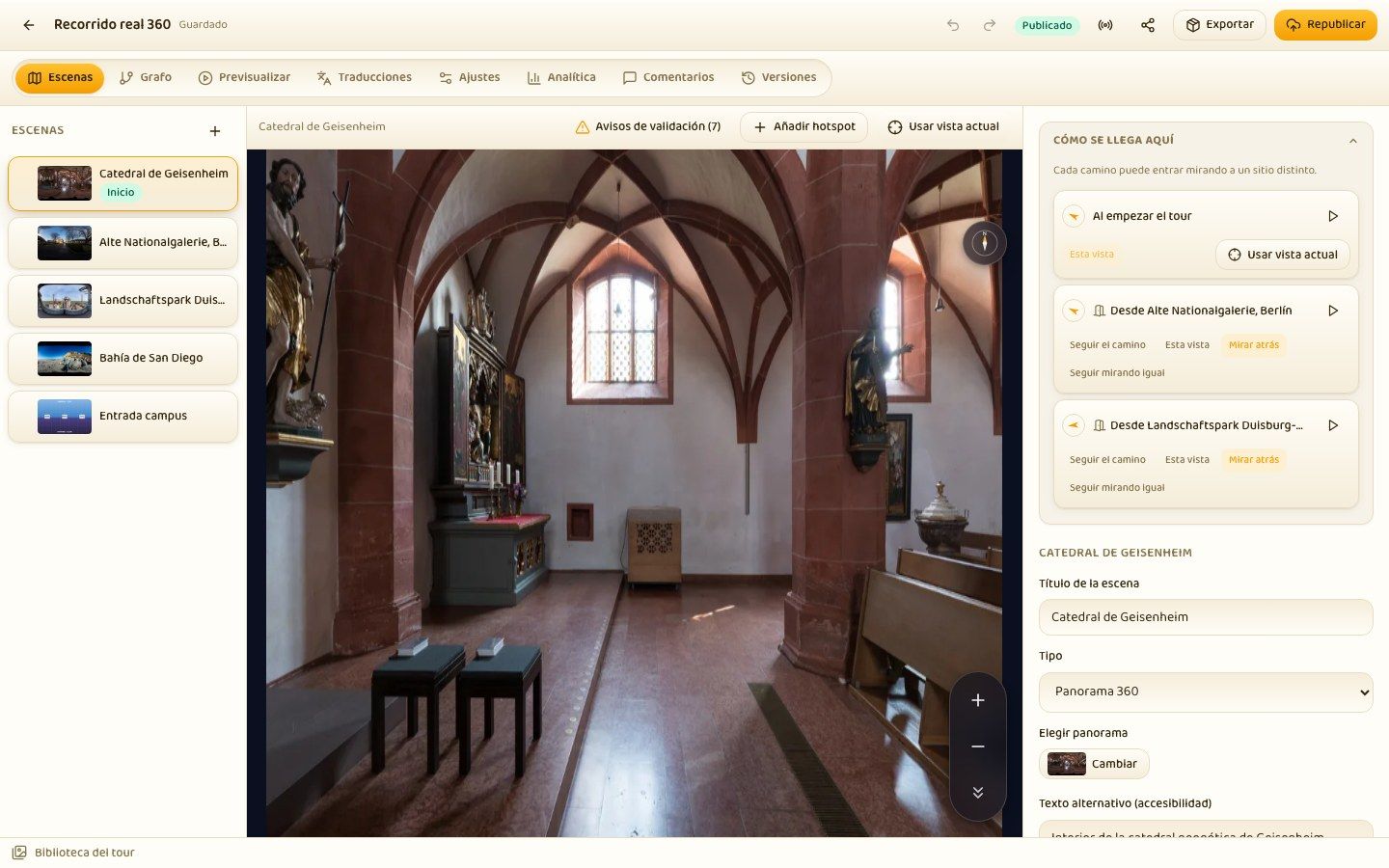
The preview is the real viewer in edit mode: what you see is what gets published. Click on the photo to place a hotspot, drag to move it, draw a polygon vertex by vertex.
The orientation you arrive with in a room belongs to the path, not to the room: entering the living room from the hallway and from the kitchen are two different arrivals, and each one keeps its own view. The “How you get here” panel gathers them all where they can be judged: in the destination scene.
the graph
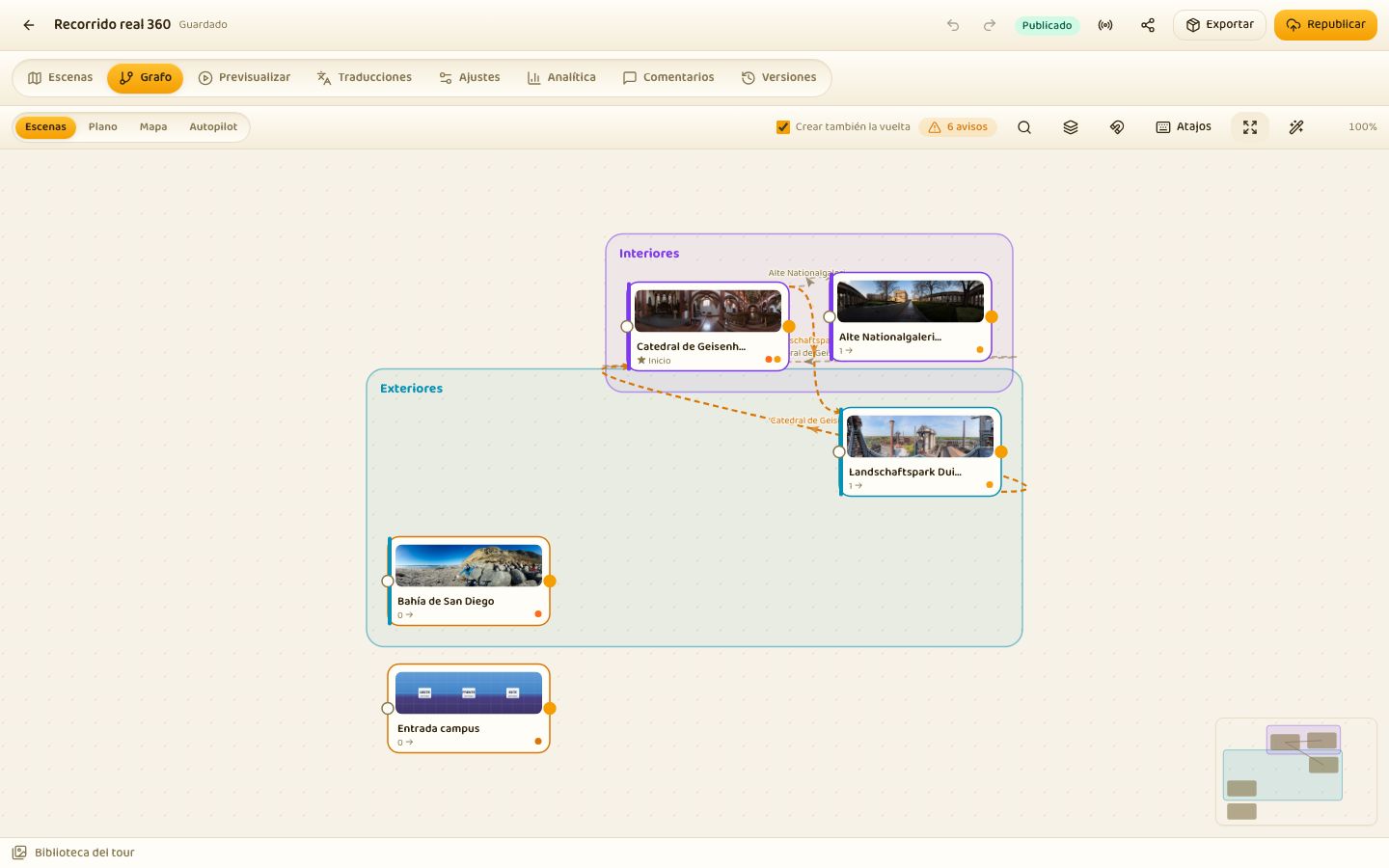
A canvas with thumbnails, ports, marquee selection, minimap and auto-layout. You connect by dragging from the edge of a node and the way back is created at once. It warns about steps without a destination, without a way back, not yet placed, and about scenes nobody can reach.
In Autopilot mode the same canvas draws guided tours: stops with dwell time, entry through the step that joins the two scenes and a turn towards the exit before crossing. It is what the kiosk and the auto-tour button play back.
the dashboard and the library
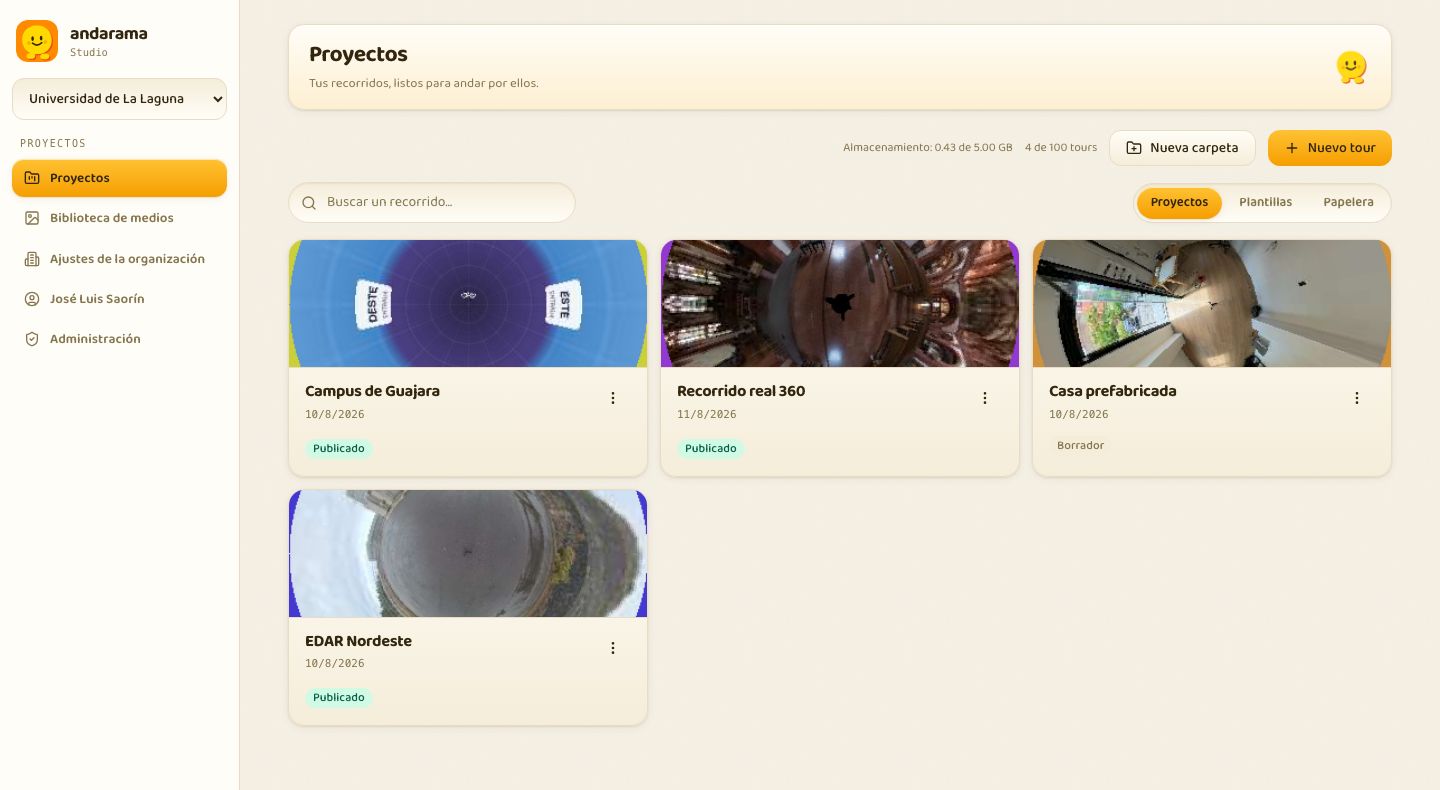
Folders, tags, templates, a thirty-day bin and search. The cover of each tour is the panorama of its starting scene. Duplicate, rename, share with a colleague and their role.
The library shows a little planet when you hover over any panorama, computed locally without touching the network, and a double click opens the photo in 360 so you can check it before using it. A single file, a selection or a whole folder can be dragged onto the graph and out come scenes.
Every hotspot has a position, an icon, a label, distance scaling and conditions (language, variables, video timestamp). And they all show up in the headset as pictograms you touch with your hand.
the viewer
Multiresolution with its own tiling up to 32K, partial panoramas, cubemaps, stereo and gigapixel flat images. Mono and stereo 360 video (MP4, WebM, HLS) with time-coded hotspots. Ambient audio with fades, narration, music with ducking and spatial audio that turns with your head.
virtual reality
Real WebXR: both views drawn at once, hands with their twenty-five joints, thumb-and-index pinch, direct touch on panels and controllers with a ray. Hands and controllers coexist in the same session.
Any phone without WebXR: split screen, gyroscope orientation with the iOS permission, gaze selection with a dwell ring and the physical button of cardboard goggles.
With a gyroscope, a reticle appears that opens whatever you look at. Immersive panels are drawn inside the session: text, image, gallery, video with transport, audio with transcript, scored quiz and comparer with a divider.
exports keep virtual reality: the engine is self-contained and the package ships with the hosting requirements
What a classroom asks for comes as standard.
Questions spread across the tour, scoring, pass mark, shuffling, attempts, final report and a PDF certificate with the student's name.
Objects hidden across the scenes, visible progress and state variables that open doors once everything has been found.
LTI 1.3 Advantage: the tour is inserted from Moodle itself, with a content picker, and sends the grade back to the gradebook. Plus SCORM 1.2 and 2004 for any other LMS.
A room with a code: the guide moves the scene and everyone's view, points with the pointer, chats; each attendee can wander off and sync back.
Sign-up, survey or contact inside the tour itself. Answers are stored and downloaded as CSV, or forwarded to a webhook.
Visits, scene funnel, most-used hotspots, time per scene and a heatmap of where people look. Without tracking anyone: GDPR-compliant out of the box.
Museums, archives, libraries, monuments and local councils have a page of their own: a navigable virtual tour, live guided tours for schools, quizzes, accessibility and a free export. Andarama for museums
<anda-tour> component with a single line of scriptNo Andarama module talks directly to Cloudflare: everything goes through an adapter layer. That is why self-hosting is not a cut-down version but the very same application.
Workers, D1, R2, KV, Durable Objects and Analytics Engine, within the free tier for small and medium use. pnpm deploy:cloudflare and in ten minutes there is an instance.
A single file for macOS, Windows and Linux with the server, the Studio and the viewer inside. Double click, the browser opens and the data stays in your home folder. No Docker, no Node, no account with anyone.
Node and SQLite in a single image, one volume and one port. docker compose up -d. Backups with a script and the portable .andarama file.
CSP with nonces, HSTS, secure sessions, double-token CSRF, rate limits, Turnstile, sanitised SVG, Markdown and CSS, audit log and permissions checked on the server on every route.
Organisations with roles (admin, editor, contributor, reader), per-project sharing, invitations, institutional SSO via OIDC with automatic sign-up by domain, two-step verification and an admin panel with quotas and usage.
Full keyboard, visible focus, 44-pixel targets, scene-change announcements, mandatory alt text with a reviewable AI suggestion, prefers-reduced-motion, WebVTT subtitles and translations per scene and per hotspot.
EUPL-1.2, strict TypeScript across the monorepo, hundreds of unit and end-to-end tests, continuous integration with dependency audits. The tour.json format guarantees that what you export will keep opening. Code, issues and downloads are at github.com/joseluissaorin/andarama.
on andarama.com accounts and payments are handled by Clerk · the data stays in Andarama's own database
Panorama was coined in 1791 to name “the view of everything”. Since then the suffix -rama has served for ways of looking: diorama, cyclorama, cinerama.
We only changed the verb. Andar is Spanish for “to walk”: a panorama is something you look at, an andarama is something you walk through.
from “andar” + “-rama” · and yes, the yellow creature walks too
Andarama is open source: free if you install it yourself. If you would rather have us look after it, andarama.com offers six plans. All of them have project limits and a fair-use policy.
14-day trial when you create your account, no card needed.
€0
forever
$2
per month
$42
per year per teacher
$20
per month
or $200 per year
$500
per year
$99
per month
or $990 per year
$1000
one-off
the payment gateway charges in US dollars; your bank does the exchange · taxes depend on your country · fair use: if usage stops being that of one person or a small team, we talk before cutting anything off
On GitHub, under EUPL-1.2. You can read it, install it, modify it and contribute. Desktop executables and release notes are published in the releases of the same repository.
Any that produces an equirectangular photo (Insta360, Ricoh Theta, GoPro Max, Kandao…) or a phone with a panorama app. Cubemaps, partial panoramas and gigapixel flat photos work too. Tiling happens in your browser up to 32K; above that, on the server.
Yes. The exported ZIP is static and self-contained: HTML, the viewer and the tiles. Upload it to any hosting, open it from a USB stick with the single HTML file, and it keeps virtual reality. And the tour.json format is documented and versioned.
If you self-host, on your server or in your Cloudflare account. On andarama.com, in Andarama's database; Clerk only stores the account and the billing. Visitor analytics use no cookies and store no IP addresses.
Through LTI 1.3: register Andarama as an external tool, pick the tour from inside Moodle and the quiz grade goes back to the gradebook. For other LMSs, the SCORM 1.2 or 2004 package.
Yes. Organisations with roles, per-project sharing, presence and soft per-scene locking so you don't step on each other, comments anchored on the photo and version history to go back.
Any with a WebXR browser (Meta Quest, Pico, Vision Pro with Safari, a PC with a headset). Open the tour's address from the headset's browser and press the VR button. Without a headset, cardboard mode works on any phone.
That the plans are meant for one person or a small team. If usage stops looking like that, we talk before cutting anything off. And if you need something without quotas, self-hosting is free and it is the same program.